- Google Bewertungen
- Google Maps
- Bewertung verbessern
- Reputation
How to improve your rating on Google Maps: 6 steps to more stars
More and better Google reviews are no accident: how to ask customers the right way, reply smartly, keep your profile in shape – and have negative reviews removed that violate the policies.
"How do I improve my rating on Google Maps?" is the question owners ask us most – usually after a handful of negative reviews has pushed the average below the magic 4.5. The good news: your Google Maps rating is not fate, it is maths plus habits. Both can be managed.
This guide shows step by step how to improve your Google reviews systematically: with real customers, a well-kept profile, smart replies – and by submitting reviews that violate Google's policies for review.
Why your Google Maps rating carries so much weight
The star figure next to your name is the first thing searchers see on Google Maps – before photos, opening hours or prices. Google itself names review count and review score as factors of prominence, one of the three building blocks of local ranking. And users filter out everything below "4.5+" with a single tap. Improving your rating on Google Maps therefore pays twice: more visibility in the results and more clicks once you are there. How expensive the opposite is, we calculated here.
Step 1: Understand how the average is made
Google shows a rounded average of all visible reviews. That sounds trivial but has two consequences many underestimate:
- The fewer reviews, the more each one weighs. With 10 reviews a single 1-star review drags the average down by almost half a star; with 200 reviews it is barely measurable.
- The way up is longer than the way down. One bad review costs in seconds what dozens of good reviews build over months.
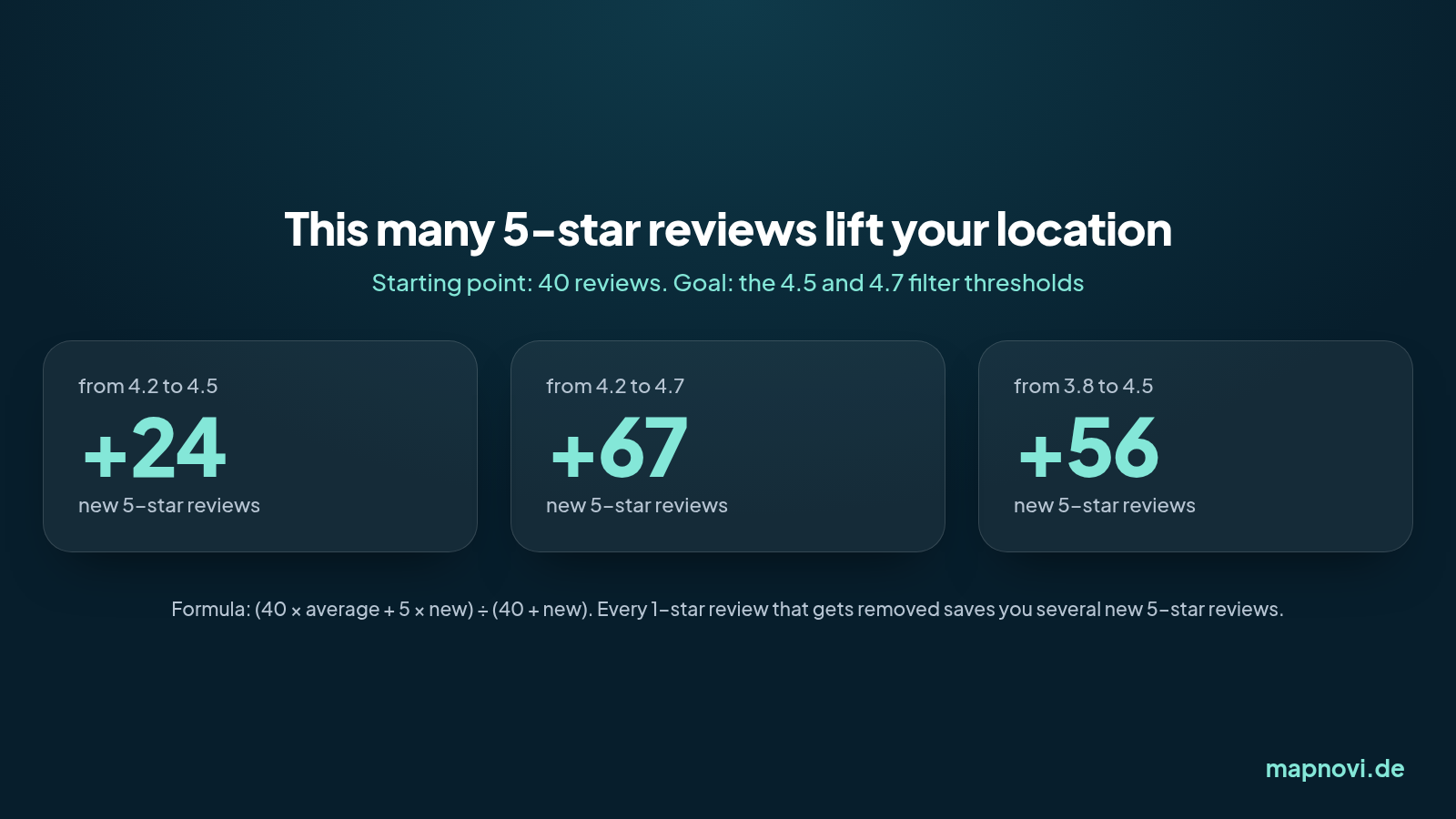
The example also shows why the other side of the equation deserves a look: with 40 reviews, one removed 1-star review has roughly the effect of four to five new 5-star reviews. Doing both is the fastest way up.
Step 2: Ask real customers for reviews – systematically

Happy customers rarely review on their own; unhappy ones almost always do. That imbalance is the main reason good businesses have worse reviews than they deserve. The fix is not a campaign but a habit:
- Pick the moment. Right after the successful appointment, handover or meal – not three weeks later in a newsletter.
- Shorten the path. Google provides a review link in your Business Profile. As a QR code on the invoice, the business card or the counter, a review costs the customer 30 seconds.
- Ask in person. "If you were happy, a short Google review helps us a lot" – from the person who served the customer. That works many times better than any automated email.
- Don't cherry-pick, don't pay. Asking only satisfied customers ("review gating") and rewards for reviews are prohibited by Google's policies. Bought reviews get removed – and damage the profile for good.
Expect a 5 to 15 percent response rate. A business serving 100 customers a month that asks consistently gains 5 to 15 new reviews – exactly the pace the infographic above calls for.
Step 3: Reply to every review
Replies do not lift the average directly – but they change what a searcher reads, and they raise other customers' willingness to review. Two rules:
- Positive reviews: short, personal, with one detail ("Glad you enjoyed the terrace"). No boilerplate the tenth customer reads for the tenth time.
- Negative reviews: factual, without justification, with an offer to resolve. How to do that in detail – and which negative reviews do not have to stay at all – is covered in our guide to negative Google reviews.
Step 4: Get the profile itself in order
A well-kept Google Business Profile brings more clicks – and more clicks bring more reviews. Check once a quarter:
- Are opening hours, address, phone number and website current? Wrong opening hours are one of the most common reasons for 1-star reviews ("stood in front of a locked door").
- Are there recent photos of your own – outside, inside and of the team?
- Are category and services set correctly so you show up for the right searches?
- Do you answer the "Questions & answers" section yourself before somebody else does?
Step 5: Have policy-violating reviews removed
Not every negative review is a customer opinion. Reviews from competitors, from people who were never customers, harassment, or reviews about the wrong location violate Google's policies – and Google removes them when the violation is laid out clearly. This is the lever with the fastest effect on the average, because every removed 1-star review counts immediately.
Honesty with yourself matters: legitimate criticism stays, and rightly so. For everything else: don't just click "Report" – submit the review for review with a reasoned explanation. Google checks and decides.
With Mapnovi you select the reviews, we submit them for review with a justification – and you only pay if a review is actually removed.
Enter your location and have your reviews checked – free, no upfront payment.
Step 6: Keep going and measure
Once a month, note down the average and the number of reviews. If the count rises and the average follows, your system works. If the count rises and the average falls, the problem is not Google but the business – and that is the most valuable information reviews can give you.
Summary: improve your rating on Google Maps in six steps
- Understand how the average is made.
- Ask real customers at the right moment – with a link or QR code.
- Reply to every review.
- Keep the Business Profile in order.
- Submit policy-violating reviews for review.
- Measure monthly.
Keep these six points up for three months and you will usually see an average that matches your business – and a profile that brings new customers instead of scaring them away.
Cover photo: Yuri Samoilov, CC BY 2.0